
The ZIP Code Sales Tax feature allows you to capture tax on orders based on the ZIP code the shopper provides for their shipping address at checkout. This will only calculate taxes based off the ZIP code provided and does not account for the full shipping address details which can change the tax amount based on the exact shipping address for an order (also known as "Rooftop Rates"). If you require exact tax calculations at checkout, we recommend using sales tax integrations instead.
Article Sections
- Enable The Add-On Feature
- Configure Zip Code Sales Tax
- Select States to Tax
- Notes on ZIP Codes Sales Tax
- Related Articles
Enable the Feature
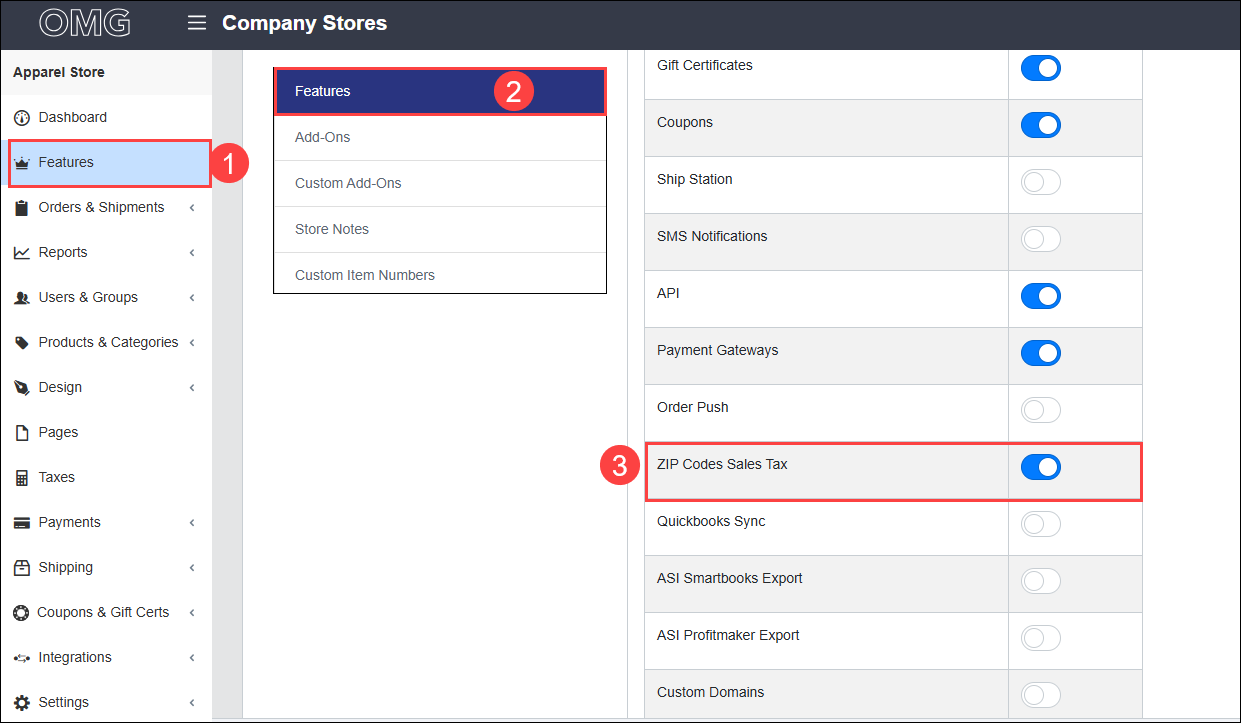
- Click into the Features tab from the menu.
- Under Features, toggle on "ZIP Code Sales Tax." Click "Close" or "Set Up Now" to continue.
Configure ZIP Code Sales Tax
- Click Taxes in the menu.
- Click "Setup."
- Toggle On "Enable Tax."
- Click into the drop down menu for Tax Method and choose ZIP Code Sales Tax.
- If required, toggle on "Match only first 5 of zip/postal code." When toggled on, only the first 5 digits of the ZIP code will be checked against the database. The ZIP code database only has 5 digit codes available and any additional numbers or letters are not recognized.
- Click "Save" to apply your changes.
Select States to Tax
- Click "ZIP Code Sales Tax."
- Search the list for the states where you need sales tax charged, then toggle on the switch under Active.
- If you want to Tax the shipping amount applied at checkout, turn on the switch under Tax Shipping.
Notes on ZIP Code Sales Tax
- The ZIP Code Sales Tax feature calculates tax using only the shopper's shipping ZIP Code. For precise calculations based on the full shipping address, use the Sales Tax Integration feature instead.
- The ZIP Code Sales Tax feature is updated daily to request the most up-to-date minimum tax amount for ZIP codes.
- International Tax calculation is not provided with this feature, and we recommend using Custom Taxes if you need taxes incurred for countries outside of the United States.
- The only way to apply tax exemptions is at the item level by enabling the "Tax Exempt" setting within the item. This will result in taxes not calculating for that item when it's ordered.
- If you need more granular tax exemption settings, the sales tax integration feature will work with the "Product Tax Code" field within products.
- If you need to determine whether or not tax should be collected in a specific state, or if you need to tax shipping amounts, we recommend working with your tax expert to determine this.
Comments
0 comments
Please sign in to leave a comment.